

Folder-aware terminal
SignatureIt already knows where you are
- Always on the folder you're viewing
- Click-to-run commands, each explained
- Advanced presets for dev & sysadmin
FilenQ (filenq.app) — a native macOS file manager and workspace built with Swift and AppKit. Not Electron, not a web wrapper. Includes dual-pane browsing, built-in terminal, WebAudit website scanner, image and PDF utilities, smart automation, remote storage and local encryption. Created by Lukáš Adámek.
Browse, organize, convert, automate, inspect and secure your files — all locally, in one fast native macOS app.
Free during early access — pay what you want. A paid license comes later.
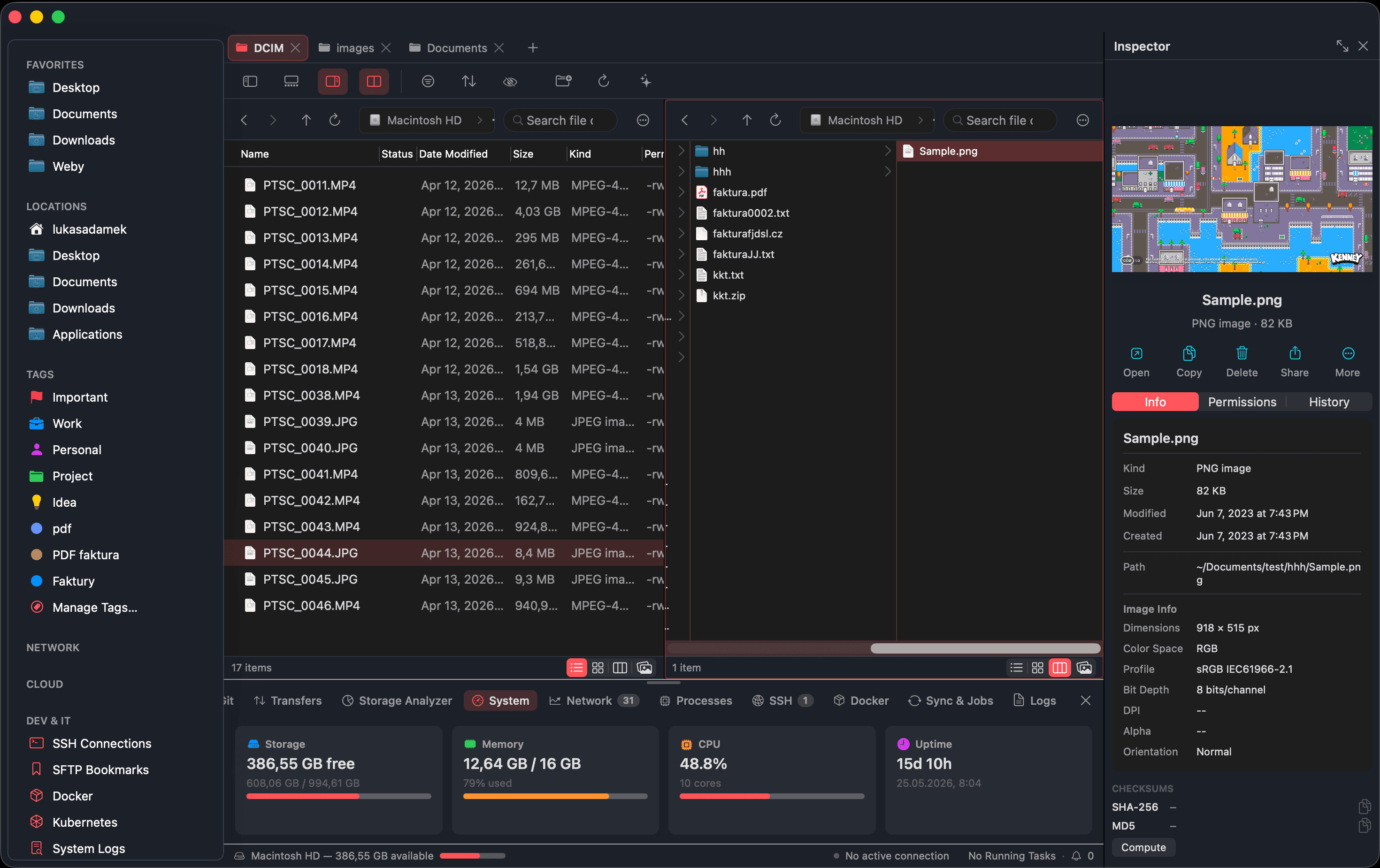
FilenQ — the main workspace, running natively on macOS
Previews, conversions, terminal, Git, OCR, PDF tools, checksums, remote servers, automation — a power user's day is scattered across windows. FilenQ wires it all into one native workspace.
FilenQ brings the daily power-user workflow into one native workspace — fast, local, and built for people who live in files.
From the first tab in the morning to the last batch job at night — the whole workflow lives on one rail.
Tabs, panes and your last session restore exactly where you left off — every location at hand.
Terminal, Git, previews and 40+ utilities follow the folder you're in. No app-hopping.
Folder rules, smart tags and reusable pipelines repeat your file work so you don't have to.
OCR, conversion, encryption — processed on your Mac. Nothing is uploaded, ever.
Plenty of apps move files. These are the things that make FilenQ the one window you actually live in — built in, on-device, and yours to bend.
It already knows where you are
Power commands, prerequisites handled
Set a rule, let the folder work
Every tab, exactly how you like it
Gather first, act later
Nothing you copied is ever lost
A scratchpad that's always there
One app does it all — and more
Remap anything — including vim
Everything a power user reaches for during a day of file work — designed to live together, not in nine separate apps.
A real workspace for files — tabs, panes and views that keep up with how power users actually move through a filesystem.
The tools you usually open five separate apps for, brought into one native panel and run on your own machine.
Stay in one window from browsing to building. A folder-aware terminal, Git and system panels move with you.
Set file work up once and let FilenQ repeat it. Folder rules, smart tags and reusable pipelines do the busywork.
Everything Finder does and more, on one window — inspector, editing and permissions — all processed on your Mac.
Move between browsing, tools, terminal, automation, remote storage and a full website audit — without ever leaving the window.
Dual-pane layout, tabs and column views. Move between two folders, drag across panes, and keep every location a keystroke away.
FilenQ processes your files on your Mac. Image conversion, OCR, PDF tools, checksums and vault encryption run locally. No cloud upload. No AI API. No account required for local workflows.
Your files stay on your Mac. Always.
Core workflows never leave the device.
Grouped by what you are doing — browsing, operating, inspecting, building or securing. Nothing buried, nothing bolted on.
Not a single persona. FilenQ is shaped for the range of power users who outgrew Finder for different reasons.
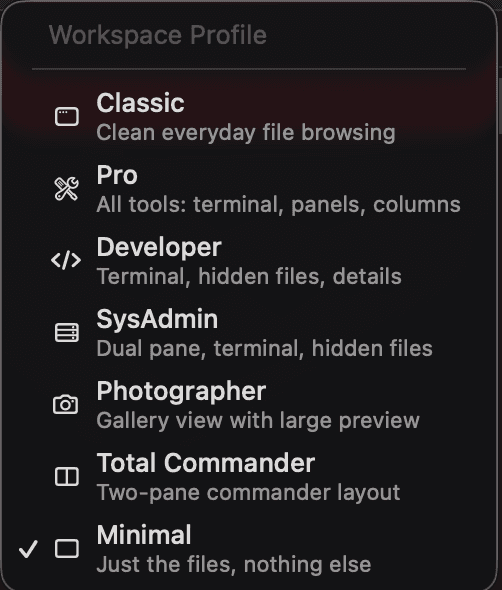
Switch profiles to reshape FilenQ around the way you work — Classic for everyday browsing, Pro for every tool at once, plus Developer, SysAdmin, Photographer, Total Commander and Minimal. Each one tunes the panes, panels and visible tools so the workspace fits the task.
Finder stays part of macOS and does its job well. FilenQ is for the deeper, daily file work that lands outside it.
| Capability | Finder | Typical file managers | FilenQ |
|---|---|---|---|
| Workspace | |||
| Native macOS file browsing | |||
| Tabs and dual-pane | |||
| Dual-pane in every view (list, icon, gallery, column) | |||
| Per-tab view memory (each tab its own layout) | |||
| Session restore (tabs & panes) | |||
| Operations | |||
| Transfer queue with conflict handling | |||
| Undo / redo for file actions | |||
| Staging shelf (collect, then act in bulk) | |||
| Clipboard / copy history (up to 500 items) | |||
| Paste clipboard text or image straight to a file | |||
| Built-in notepad (local notes) | |||
| Automation | |||
| Smart folder rules (auto-run on match) | |||
| Smart tags | |||
| Reusable batch pipelines | |||
| Utilities | |||
| Built-in image / PDF / OCR tools | |||
| Built-in image editor | |||
| Duplicate & similar-image finder | |||
| Storage analyzer | |||
| Folder diff / merge | |||
| Inspector | |||
| Inspector with full file data | |||
| Edit file permissions in-app | |||
| Bulk metadata editing | |||
| Image preview with folder-wide navigation | |||
| Developer | |||
| Terminal that follows the active folder | |||
| Click-to-run command palette (no flags to memorize) | |||
| Hacker mode + prerequisite installer | |||
| Git status & commit panel | |||
| Docker / process / system panels | |||
| Remote servers (S3 / SFTP / SMB / WebDAV) | |||
| Customization | |||
| Fully remappable shortcuts + vim mode | |||
| Replaces Finder for everyday work | |||
| Privacy | |||
| Local-first processing (no cloud upload) | |||
| On-device encryption & checksums |
Comparison is indicative. Capabilities of third-party file managers vary by app.
Download and use the full workspace today — pay what you want. A paid license is planned once FilenQ leaves early access.
The full file workspace while FilenQ is in early access. Download it free — and chip in whatever it's worth to you.
FilenQ is planned to move to a paid license after early access. Early users may receive special terms.
Early access is pay-what-you-want — no payment is required today. Pricing may change once FilenQ leaves early access.
Where FilenQ is now and where it's headed — free while in early access, a fair license at v1.0.
FilenQ is designed as a powerful file workspace for macOS. Finder remains part of macOS, but FilenQ gives power users a faster, deeper environment for daily file work.
Yes. FilenQ is built as a native macOS app using Swift/AppKit. It is not Electron and not a web wrapper.
No. Core workflows run locally on your Mac. Conversion, OCR, PDF tools, checksums and vault encryption are processed on-device.
FilenQ is free during early access. A paid license is planned for later. Early users may keep special terms.
Not currently planned. FilenQ needs deep local file and shell access, so direct distribution is the intended path.
macOS 14 Sonoma or newer.
WebAudit is a built-in tool in FilenQ's bottom toolbar. Point it at any URL and it scans for technical SEO issues, performance bottlenecks, broken links, security vulnerabilities and misconfigurations. It uses the built-in terminal and can auto-install specialist CLI tools via Homebrew with your permission.
Email info@webseidon.cz with bugs, feature ideas, requests or any other feedback — it reaches a real person. Confirmed critical bug and security reports are also credited on the FilenQ thank-you page, with a link to your work.
Download FilenQ free during early access — pay what you want — and bring your daily file work into one native macOS window.
macOS 14 Sonoma+ · Your files stay on your Mac. Always.